

Executive Summary
In the dynamic world of digital products, success hinges on delivering a flawless user experience (UX). This article explores how combining the Cognitive Walkthrough — a qualitative technique for identifying friction — with Task Flow Analysis — a quantitative methodology for measuring user effort — becomes a powerful strategy. Discover how this dual approach enables digital leaders and product teams not only to uncover hidden pain points, but also to quantify the impact of optimisations, ensuring that every iteration translates into higher user satisfaction and stronger product performance.
Within Research teams, we often find ourselves testing platforms or apps with users who already know them inside out: the so-called heavy users. In these cases, highly structured tests — with clearly defined tasks and rigid steps — do not always allow us to fully explore the pain points that emerge during everyday product use.
That is why we began incorporating a different methodology: the Cognitive Walkthrough. It is a semi-structured exploratory technique that allows people to move freely through the interface while identifying friction, improvement opportunities, and critical aspects of the experience.
While we still follow a general guideline with overarching goals, the objective of this technique is to capture the user’s spontaneous perception, grounded in their real usage flow. This becomes particularly valuable when working with products where advanced users are so familiar with the interface that traditional usability testing fails to surface meaningful issues.
But we did not stop there.
We began combining the Cognitive Walkthrough with another tool that adds a quantitative lens: Task Flow Analysis. This technique allows us to see how many actions a user performs and the level of effort each one requires. In this way, qualitative and quantitative insights come together in a single conversation.
The combination of both methodologies helps us validate insights from exploratory testing by backing them up with hard data. This is particularly useful when communicating findings to stakeholders, as it provides a concrete way to demonstrate why a task flow needs to be iterated in order to improve the experience.
It All Started with an Article
Beyond analysing interfaces, running benchmarks, conducting interviews and workshops, working in Figma, and using Miro (among many other things), I have a habit: I save articles. A lot of them. I have a UX Research folder that functions like my own personal library, where I collect everything I find, what colleagues share, or what I read online.
In that folder there is an article from UX Magazine (yes, it is still there) that proposes a very interesting method for analysing task flows. I rediscovered it some time ago and realised it was perfect for strengthening Cognitive Walkthroughs by combining a qualitative approach with a quantitative layer.
Deep Exploration: The Cognitive Walkthrough in UX
That is why we incorporated a different and highly effective methodology: the Cognitive Walkthrough.
“This semi-structured exploratory technique allows users to move freely through the interface while identifying friction, opportunities for improvement, and critical aspects of the experience.”
Although we follow a guide with general objectives, the main purpose of the Cognitive Walkthrough is to capture the user’s spontaneous perception, based on their real usage flow. This is particularly valuable when working with products where advanced users have such a high level of familiarity that traditional usability testing fails to reveal important issues or meaningful UX insights.
Combining Qualitative and Quantitative: Task Flow Analysis
But we do not rely solely on qualitative insights. We have started combining the Cognitive Walkthrough with another tool that brings a quantitative perspective to UX: Task Flow Analysis.
This technique allows us to:
- Quantify how many actions a user performs.
- Measure the level of effort required for each of those actions.
In this way, qualitative and quantitative research meet in a single conversation. The combination of these methodologies helps us validate UX insights from exploratory testing by supporting them with concrete data. This is extremely valuable when communicating findings to stakeholders, as it provides a tangible way to demonstrate why a specific task flow needs to be optimised to improve user experience and digital product performance.

The Inspiration Behind the Methodology
In addition to analysing interfaces, running benchmarks, interviews, and workshops, and using tools such as Figma and Miro, our team has a habit of collecting relevant articles and papers. My UX Research folder is like a personal library where I store everything I come across.
Within that collection, I rediscovered a valuable UX Magazine article proposing a compelling method for analysing task flows. It felt like the perfect complement to Cognitive Walkthroughs, combining qualitative exploration with a quantitative layer that is essential for UX optimisation.
How Does Task Flow Analysis Work?
The logic is simple: it involves mapping, step by step, the full journey a person takes to complete a task — including every screen and action required.
Once the full flow is defined, we detail each action the user must perform to complete the task. These actions depend on the type of flow being analysed and the device in question. Using a mobile app is not the same as using a desktop platform.
It is also important to note that not all flows involve the same types of actions. Some include gestures, biometric validation, welcome screens, or scrolling; others may involve only data entry and clicks. That is why the analysis must focus on a specific flow that can be clearly quantified.
For example, if we analyse a bank transfer flow in a mobile app, we might classify actions and effort levels as follows:
- Tap (effort level: 1)
- Scroll (effort level: 3)
- Data entry (effort level: 10)
- Biometric authentication (effort level: 5)
Each action is evaluated based on time and accumulated effort. For example, tapping a button is simple and therefore rated as effort level 1. Data entry, on the other hand, requires opening the keyboard, typing, and reviewing input — so it is rated as effort level 10.
With actions defined and effort levels assigned, we build a table and calculate the total screen by screen.
The formula is:
Number of actions × Effort level
For example:
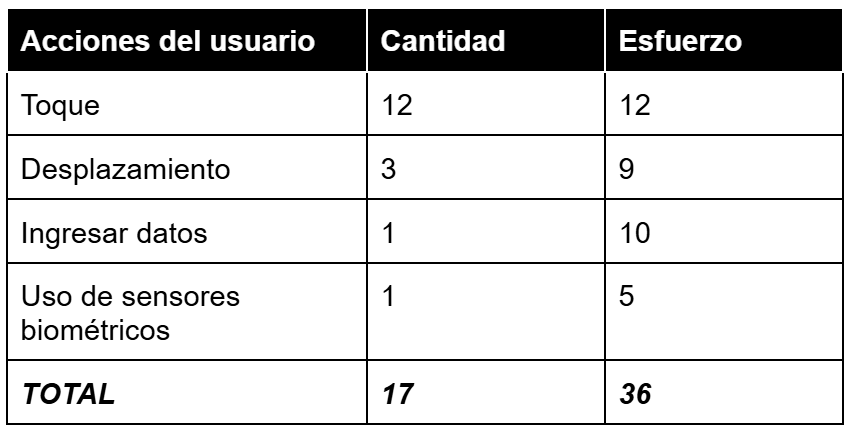
This table allows us to see, in a concrete way, how many actions a flow requires and how demanding it is to complete.
Reducing Effort and Improving Efficiency Through UX
If we redesign that task flow and optimise it based on intended user behaviour and UX/UI best practices, we can clearly demonstrate how much the experience improves — and, consequently, how operational efficiency increases.
Comparison: Initial Flow vs. Iterated Flow (Optimisation Example)
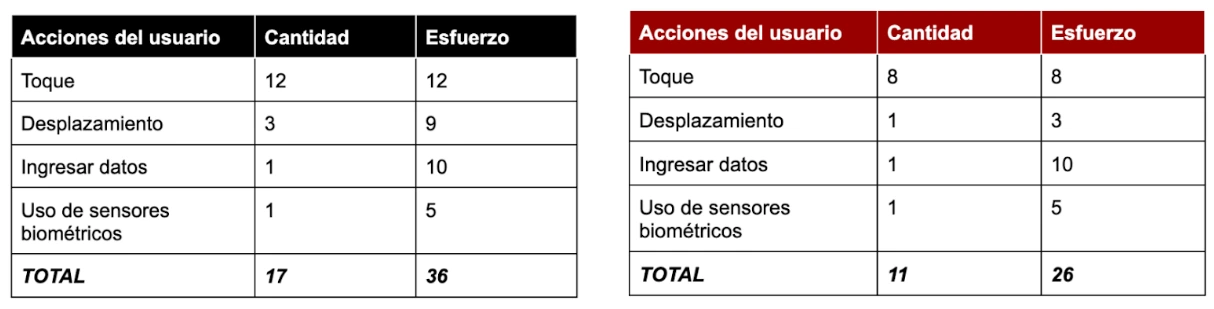
In this example, if the original flow had a total effort score of 36 and the optimised flow 26 (for instance, by removing two scrolling steps or simplifying initial taps), we can state that the iterated flow is 28% simpler than the original.
“The key to this analysis is the tangible reduction in user effort. Not bad, right?”
Integrating Cognitive Walkthroughs with Task Flow Analysis gives us a more complete view of the user experience: both how people feel when using a product (qualitative insights) and what they actually do (quantitative data). It is a powerful and essential combination — especially useful when working to optimise complex flows and ensuring that every interaction contributes to user satisfaction, digital product success, and technological innovation.
For a deeper understanding of how similar methodologies impact efficiency, you can explore studies on the importance of usability in digital platforms.